The Playwright BDD Reporter
with AI Failure Analysis
playwright-spec-doc-reporter generates self-contained HTML dashboards with BDD annotations, AI-powered root-cause analysis, Jira integration, flakiness scoring, and run history — all with zero runtime dependencies.
npm install -D playwright-spec-doc-reporter
Features
Everything your Playwright reporter is missing
Built for teams that need more than a pass/fail count. Every feature works independently — enable only what your workflow needs.
Interactive HTML Dashboard
Dark-themed, self-contained report. Filter by status, search by name, drill into failures. No server — open anywhere.
BDD Annotations
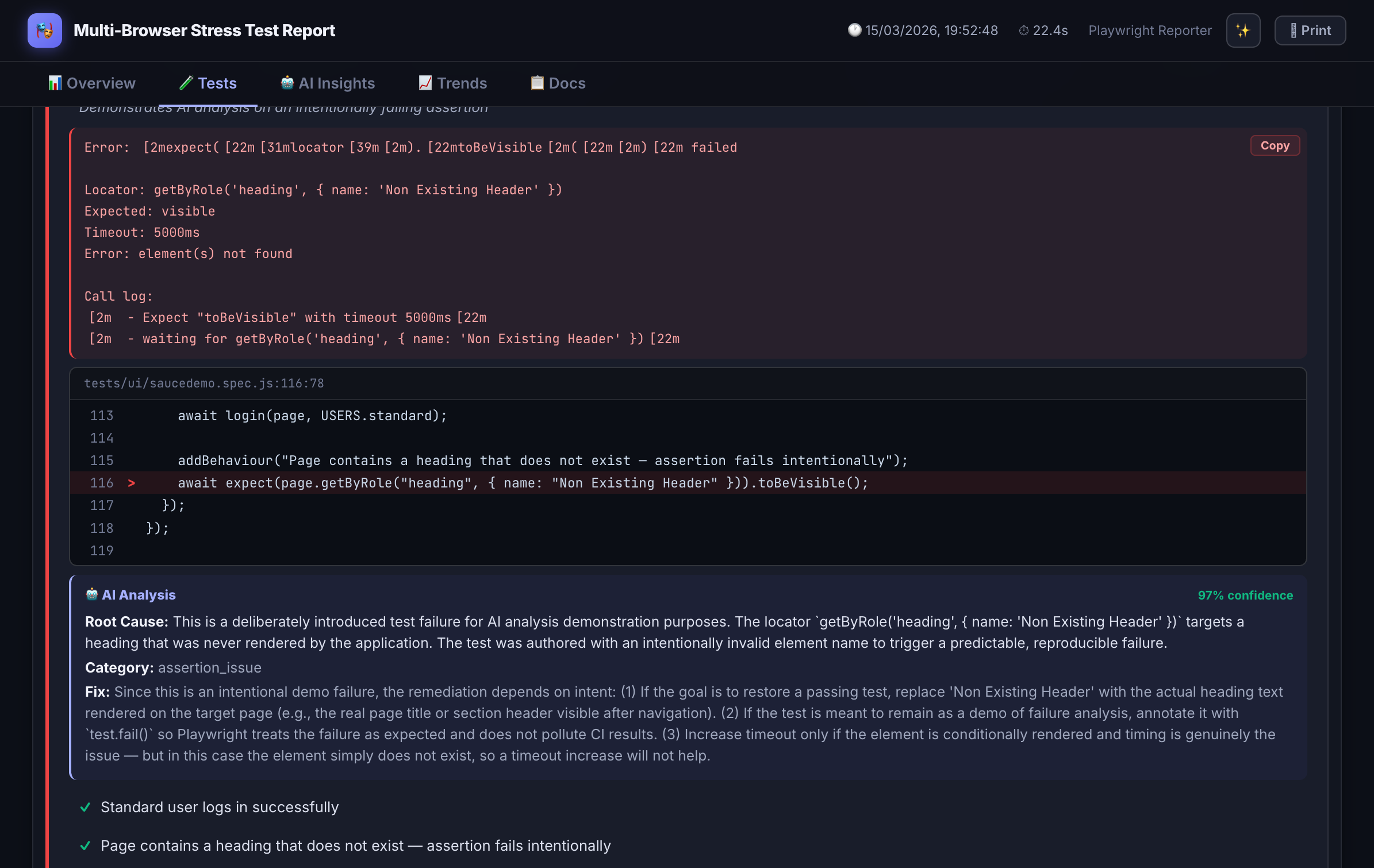
Attach Feature, Scenario, and Behaviour tags directly in test code. Rendered as living documentation alongside results.
AI Failure Analysis
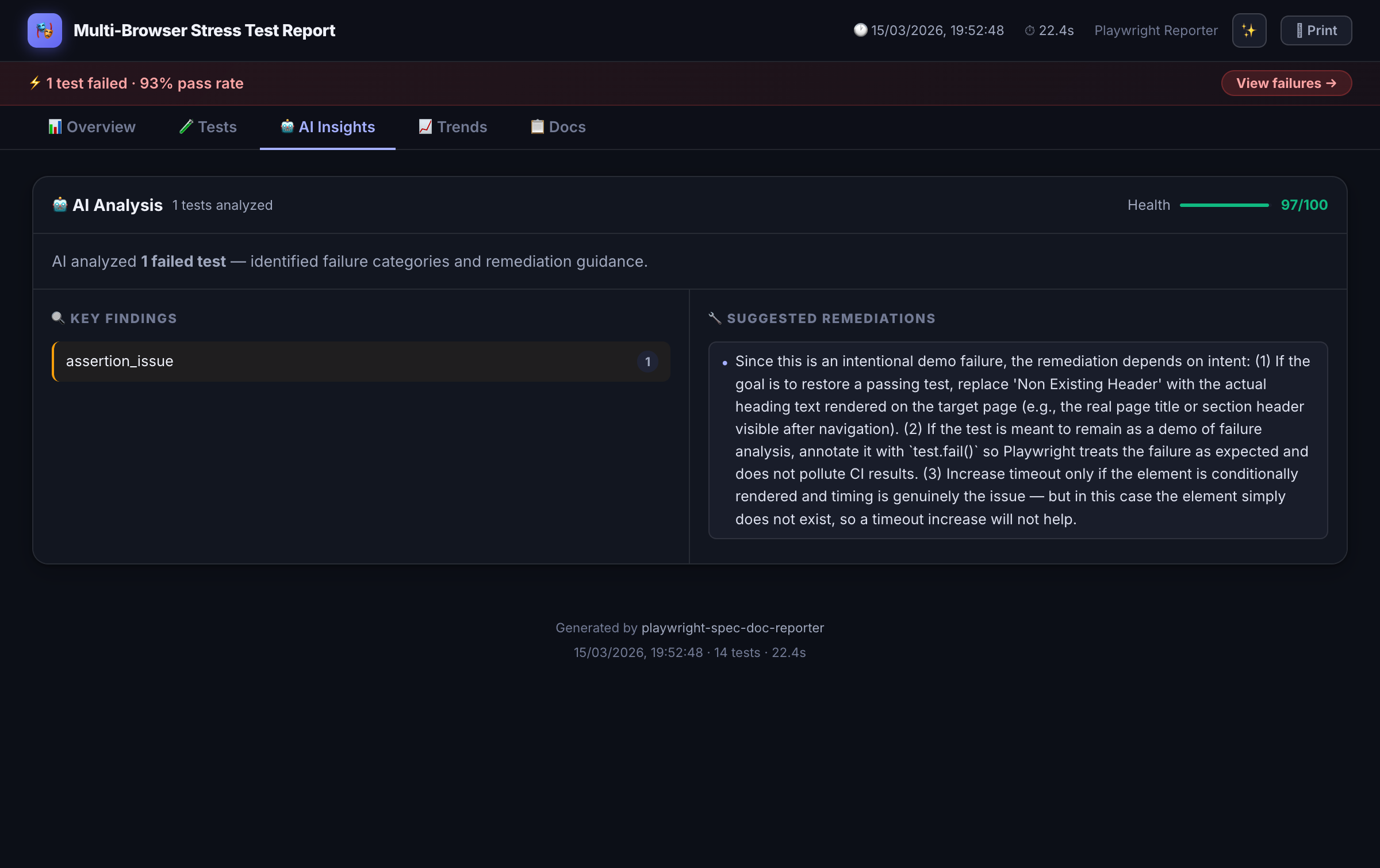
Failed tests get a structured root-cause explanation from Claude, GPT-4, Azure OpenAI, or a custom provider.
Self-Healing Detection
Detects Playwright Healer locator drift, shows diff panels, and generates healing payloads for triage.
Jira Integration
Tags tests to Jira issues. Posts results as comments with screenshots, API logs, and pass/fail status.
PR Comment Mode
Emits a compact markdown summary for GitHub and Azure DevOps pull request comments.
Flakiness Scoring
Per-test stability badges (0–100%) from run history. Surface unreliable tests before they cause incidents.
Run History & Trends
Pass-rate and duration trend charts across runs. Track regression patterns over time.
Spec-to-Test Traceability
Maps Playwright Agent spec files to generated tests. Closes the loop between specification and execution.
Quick Start
Up and running in 4 steps
1. Install
npm install -D playwright-spec-doc-reporter2. Create the reporter shim
Playwright loads reporters in a separate worker context. Create a thin shim in your project root:
// reporter.mjs
export { default } from 'playwright-spec-doc-reporter/reporter';
3. Configure playwright.config.ts
import { defineConfig } from '@playwright/test';

export default defineConfig({
  reporter: [
    ['./reporter.mjs', {
      outputFolder:    './test-results',
      theme:           'dark-glossy',   // 'dark-glossy' | 'dark' | 'light'
      aiAnalysis:      false,           // true to enable AI failure analysis
      aiProvider:      'anthropic',     // 'anthropic' | 'openai' | 'azure' | custom
      jiraIntegration: false,
      prComment:       false,
    }]
  ],
});
4. Run your tests
npx playwright test
# → open test-results/index.html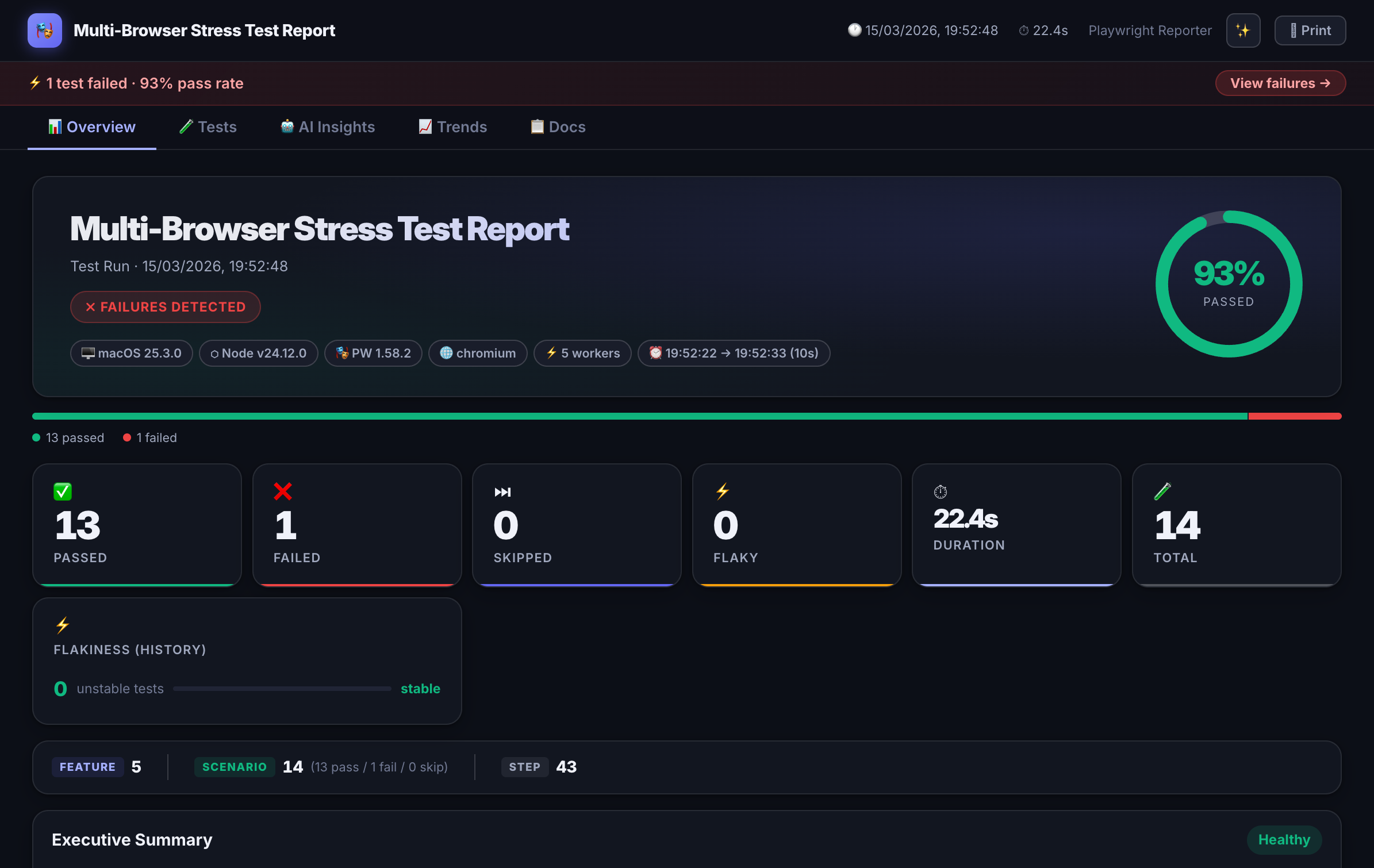
BDD Support
Playwright BDD annotations without Cucumber
Add structured Feature / Scenario / Behaviour metadata to any Playwright test using the built-in annotation helpers. No Cucumber setup, no separate spec files.
import { test } from '@playwright/test';
import { feature, scenario, behaviour } from 'playwright-spec-doc-reporter/annotations';

test('user can complete checkout', async ({ page }) => {
  feature('Checkout Flow');
  scenario('Complete purchase with credit card');
  behaviour('Given the user has items in their cart');
  behaviour('When they proceed to checkout and submit payment');
  behaviour('Then an order confirmation is displayed');

  await page.goto('/cart');
  // ... your test steps
});
AI Failure Analysis
Root-cause explanations, not just stack traces
When a test fails, the reporter sends error context to your configured AI provider and surfaces a structured explanation inside the dashboard — not a generic timeout message.
"The checkout button wasn't clickable because a promotional modal appeared and blocked the element. This is likely a race condition — the modal loads asynchronously after page navigation. Consider waiting for the modal to dismiss or handling it in beforeEach setup."
Context sent to the model includes the error message, test code, BDD annotations, attached screenshots, and any inline API request/response logs.
Enable AI analysis
// playwright.config.ts
['./reporter.mjs', {
  aiAnalysis:  true,
  aiProvider:  'anthropic',           // or 'openai' | 'azure' | custom URL
  aiModel:     'claude-3-5-haiku-20241022',
  aiApiKey:    process.env.ANTHROPIC_API_KEY,
}]
Configuration Reference
All options
| Option | Type | Default | Description |
|---|---|---|---|
| outputFolder | string | 'test-results' | Directory for all output files |
| theme | string | 'dark-glossy' | 'dark-glossy' | 'dark' | 'light' |
| aiAnalysis | boolean | false | Enable AI-powered failure analysis |
| aiProvider | string | 'anthropic' | 'anthropic' | 'openai' | 'azure' | custom URL |
| aiModel | string | provider default | Model ID for the AI provider |
| aiApiKey | string | env var | API key (recommend via env, not hardcoded) |
| jiraIntegration | boolean | false | Enable Jira issue commenting |
| jiraBaseUrl | string | — | Your Jira instance base URL |
| jiraToken | string | env var | Jira API token |
| prComment | boolean | false | Emit pr-comment.md for GitHub / Azure DevOps |
| historyFile | string | 'spec-doc-history.json' | Path for run history (flakiness + trends) |
Comparison
playwright-spec-doc-reporter vs alternatives
| Feature | playwright-spec-doc-reporter | Allure (Playwright) | Built-in HTML Reporter |
|---|---|---|---|
| Self-contained HTML (no server) | ✓ | ✗ (needs allure serve) | ✓ |
| BDD annotations in test code | ✓ | Partial (separate spec files) | ✗ |
| AI failure analysis | ✓ | ✗ | ✗ |
| Flakiness scoring | ✓ | Partial (retries only) | ✗ |
| Jira integration | ✓ | ✓ (Xray plugin) | ✗ |
| PR comment output | ✓ | ✗ | ✗ |
| Run history & trends | ✓ | ✓ | ✗ |
| Zero runtime dependencies | ✓ | ✗ | ✓ |
FAQ
Frequently asked questions
Does this work with Playwright Test v1.44+?
Which AI providers does the failure analysis support?
aiProvider in playwright.config.ts. AI analysis is entirely optional — disable it with aiAnalysis: false.Is the HTML report self-contained? Can I share it without a server?
How does flakiness scoring work?
spec-doc-history.json — a local file that accumulates run history. 0% = always passes, 100% = alternates between pass and fail every run. The score is displayed as a badge on each test in the dashboard.How does Jira integration work?
What is the difference vs Allure for Playwright?
allure-commandline and allure serve to generate and view the report — it's not self-contained. playwright-spec-doc-reporter outputs a single HTML file with zero runtime dependencies. It also adds AI failure analysis, flakiness scoring, and Jira/PR integration that Allure doesn't have out of the box.Can I use BDD annotations without Cucumber or Gherkin files?
test() blocks using feature(), scenario(), and behaviour() helpers imported from the package. No separate .feature files, no Cucumber setup, no extra config.